Plan your year around payday
Add each paycheck once and Ledgerly lays out your whole year, including the months with an extra paycheck.
Simple budgeting, built around your paycheck
Ledgerly turns your paychecks into a plan for the year, then shows what you’ve spent, what’s left and how your savings goals are doing, each month. And it works right inside ChatGPT and Claude: ask how you’re doing, and the AI you already use checks your real plan.
Free to start. No credit card, no bank login. Or try it without an account.
How it works
Enter your take-home pay and how often you’re paid. Ledgerly even spots the months with an extra paycheck.
Give every dollar a job: decide how much goes to rent, groceries, bills and savings. Ledgerly shows what’s left to assign (income you haven’t planned for yet) as you go.
Log what you spend as you go. Your budget, savings goals and charts update right away, on every device.
What you get
Add each paycheck once and Ledgerly lays out your whole year, including the months with an extra paycheck.
Log a purchase in a few taps or import a spreadsheet. With Premium, scan a receipt and Ledgerly fills it in.
Set money aside every month for an emergency fund, a trip or retirement, and watch each goal fill up.
See where your money went this month, by category. Premium adds trends and charts across every month.
Keep a budget for each household, each with its own income, categories and savings goals.
Your budget is yours. Ledgerly never sells your data, shows you ads or asks for your bank login.
Receipts are read on your device. The photo is never uploaded.
Download all your data, or delete your account and everything in it, any time.
AI chat
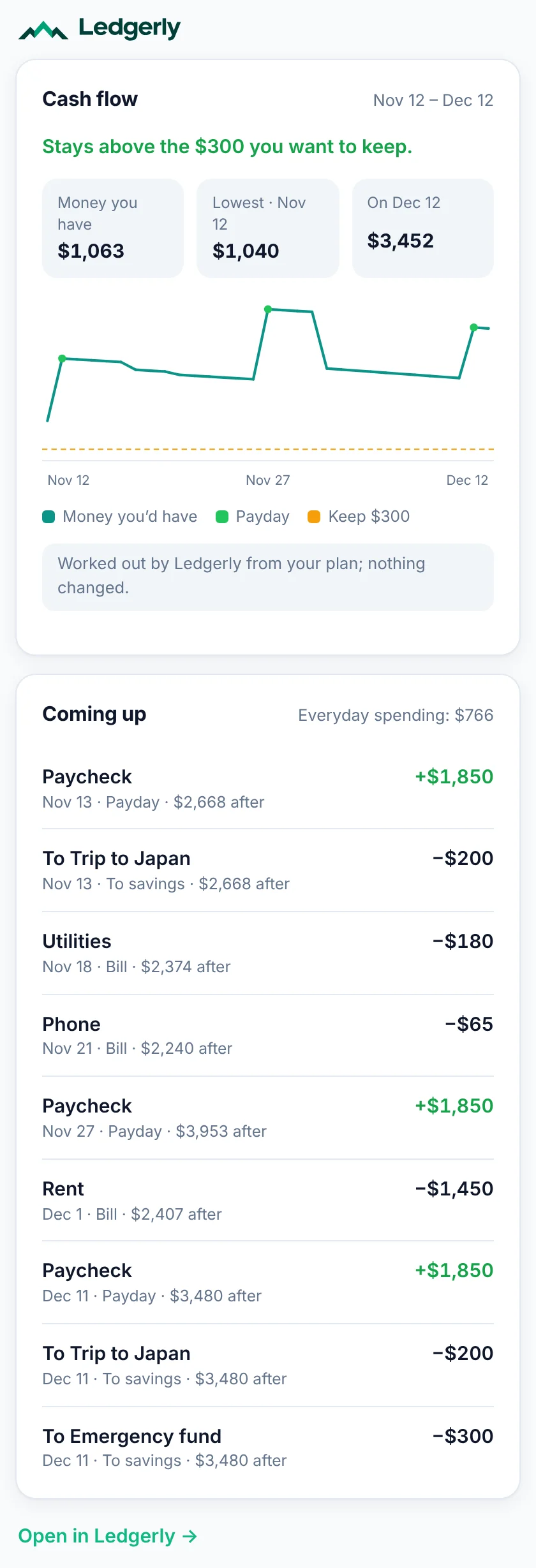
Connect Ledgerly to Claude, ChatGPT or another AI app and ask in your own words. Ledgerly works out the answer from your budget and shows it as one of its own cards.
Will I have enough until my next paycheck?
Pricing
$99.99 a year
Premium is free while payments are being tested: upgrade in the app and nothing is charged. When real payments start, Premium will be $99.99 a year (there’s no monthly plan). I’ll email you well before then, and nothing is charged unless you choose to pay.
Why I built Ledgerly
Hi, I’m Jackson. I tried the popular budgeting apps and kept getting lost in screens, buttons and settings, when all I wanted to know was how much I could still spend this month. So I built the app I wanted: made by one person, and simple on purpose. If a screen ever feels confusing, that’s on me to fix, not on you to figure out.
Jackson, creator of Ledgerly
Read the whole story →If you want it to, and never with your bank login. With Premium, link your bank through Plaid, read-only: you sign in at Plaid (never in Ledgerly), your balances stay current, and new transactions wait for you to check before anything is saved. Or enter your spending yourself, scan a receipt or import a statement. Already linked your bank in ChatGPT or Claude? Ask it to check Ledgerly against your bank, and you review anything new (how).
Only you, plus anyone you choose to let in: a second person you add to your account, or an AI app you connect.
Each account’s data is walled off in the database and encrypted in transit and at rest. Ledgerly never sells it or shares it for advertising, and I only look at it if you ask me to help with a problem. See the Privacy Policy.
To make an account: your name, email, phone, mailing address and date of birth. Each one is required: they confirm you’re 13 or older, and help show the account is yours if you’re ever locked out. They’re never shown to AI apps.
Usage data: which pages and features are used, never amounts, names or anything you type. It’s on unless you turn it off in Settings or your browser asks sites not to track it.
Optional AI features, only when you ask: “Let AI read this layout” sends the first 25 rows of a spreadsheet, and “Find each item with AI” sends the text read from a receipt on your device (never the photo), to an AI provider that doesn’t keep it. Details in the Privacy Policy.
Yes. Connect Ledgerly to Claude, ChatGPT or another AI app and ask about your budget in your own words. Ledgerly works out the numbers itself, and purchases are saved only after you check them. On the Free plan it can show your budget, spending and net worth, log purchases and check your bank against Ledgerly; Premium adds changing the plan from the chat, what-ifs and households. See how it works.
Yes. Open the web app on your phone and add it to your home screen.
Soon. Leave your email below and I’ll send one email at launch. Your account works in the apps too, with the same budgets.
Free gives you one budget with up to 5 spending categories and 1 savings goal, plus Ledgerly in AI apps (seeing your budget, logging through forms and checking your bank), and it stays free. Premium is $99.99 a year and unlocks everything: more budgets, categories and savings goals, repeating transactions, receipt scanning, full insights, what-if plans, everything in AI apps and more. You can cancel any time: Premium lasts until the end of your yearly term, then the Free plan’s limits apply again. Nothing you’ve entered is deleted.
In the app: Settings → Delete account. It removes your account and every budget in it right away, and cancels Premium so you’re not charged again.